
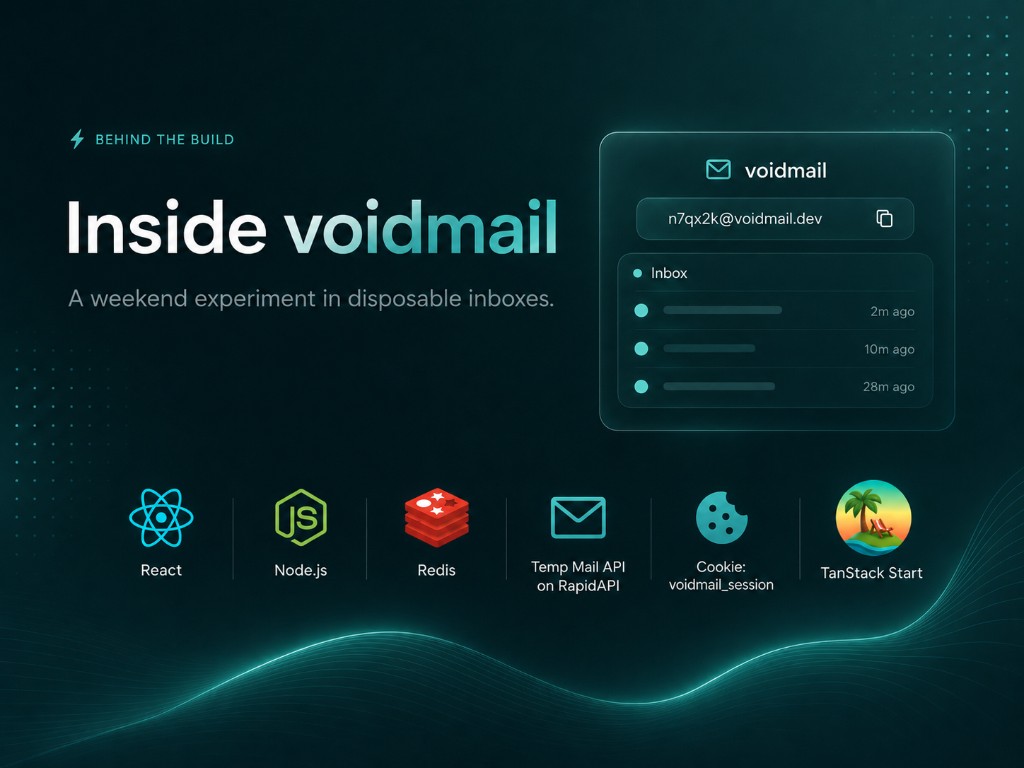
How I built "voidmail" over the weekend
By Eurika · June 15, 2026
Normally, my weekends are like: Playing COD with my friends and then binge watching a bunch of youtube videos(because why not?). Then this weekend, I prompted chatGPT asking it what project should I do for this weekend that should be fun. ChatGPT suggested that I build an email service so I thought of a temporary email service since that'll be easier to build. From there I built the whole thing with Cursor AI's Composer 2.5 — scaffolding the TanStack Start app, wiring Redis sessions, and iterating on the inbox UI.
voidmail is a free temporary email inbox: open the site, copy an address, receive mail, and walk away. No accounts, no passwords, no profile to maintain. The full source is on GitHub.
I built it with TanStack Start — a full-stack React framework that ships with file-based routing, SSR, and typed server functions out of the box. That last piece mattered most: I needed a server boundary to hide the API key and set httpOnly cookies without standing up a separate backend.
Under the hood I also use the Temp Mail API on RapidAPI — a REST service that creates disposable mailboxes, receives messages over SMTP, and exposes them through JSON endpoints. Mailboxes expire after 24 hours by default (configurable up to 30 days).
This article explains the architecture I chose and how you can build something similar.
The problem I wanted to solve
A temp-mail product needs three things at once:
- A real mailbox on the backend — something that can receive SMTP mail.
- Per-visitor isolation — your inbox must not be visible to the next person who opens the site.
- Zero friction — no signup flow, no OAuth, no "create an account first."
Calling the Temp Mail API directly from the browser fails on all three counts. The API key would be exposed, every visitor would share the same subscriber-scoped mailboxes, and there would be no way to tie an address to a single browser session.
My answer: keep the API key on the server, and map each visitor to their own mailbox through a session.
Architecture at a glance
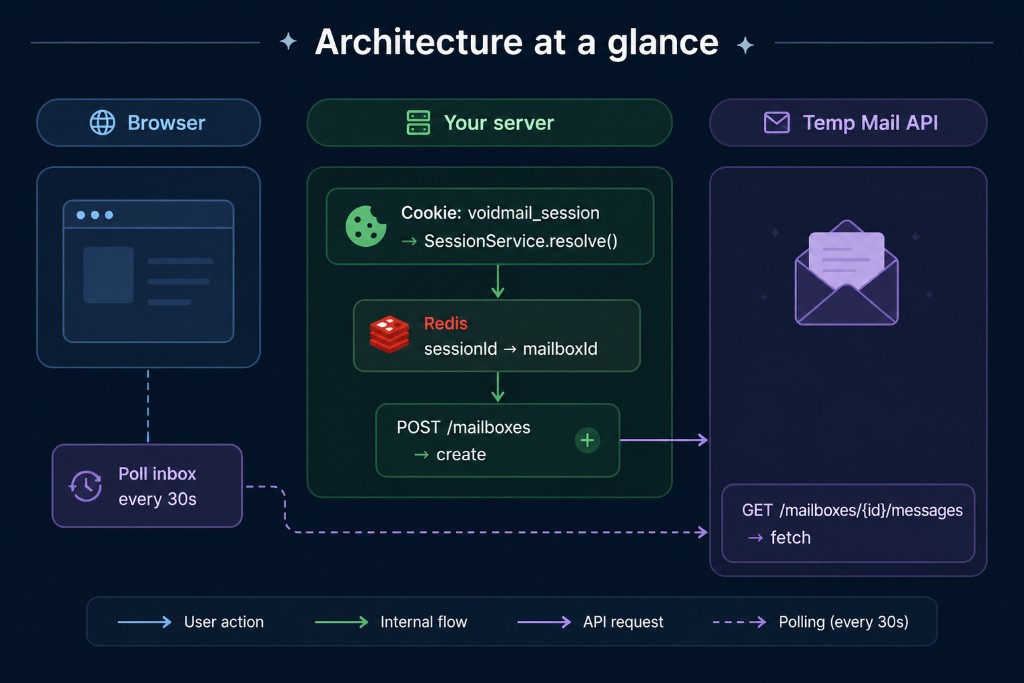
The browser never sees the RapidAPI key. It only holds an opaque session cookie. Redis stores the link between that session and the mailbox UUID returned by the API.
The stack: TanStack Start (React + Vite) for the app shell and server functions, TanStack Router for file-based routes, TanStack Query for client-side polling, Redis for session storage, and the Temp Mail API for actual mail delivery.
Step 1 — Subscribe and configure the API
Subscribe to Temp Mail on RapidAPI and copy your key. Every request needs these headers:
| Header | Value |
|--------|-------|
| X-RapidAPI-Key | Your subscription key |
| X-RapidAPI-Host | temp-mail144.p.rapidapi.com |
| Content-Type | application/json (for POST bodies) |
Base URL: https://temp-mail144.p.rapidapi.com
Store the key in a server-side environment variable — never in client bundle:
# .env (server only)
RAPIDAPI_KEY=your_key_here
RAPIDAPI_HOST=temp-mail144.p.rapidapi.com
RAPIDAPI_BASE_URL=https://temp-mail144.p.rapidapi.com
REDIS_URL=redis://localhost:6379
SESSION_TTL_SECONDS=86400
We align SESSION_TTL_SECONDS with the mailbox lifespan (86,400 seconds = 24 hours) so the session and the mailbox expire together.
Step 2 — Wrap the API in a typed client
The Temp Mail API exposes a small surface: domains, mailboxes, and messages. We wrap it in a class with Zod validation so bad responses fail fast during development.
import { z } from 'zod'

const mailboxSchema = z.object({
  id: z.string().uuid(),
  email: z.string().email(),
  created_at: z.string(),
  expires_at: z.string(),
  // ...
})

export class MailboxApiClient {
  constructor(
    private baseUrl: string,
    private apiKey: string,
    private host: string,
  ) {}

  async createMailbox(input: { lifespan?: number } = {}) {
    const response = await fetch(`${this.baseUrl}/mailboxes`, {
      method: 'POST',
      headers: {
        Accept: 'application/json',
        'Content-Type': 'application/json',
        'X-RapidAPI-Key': this.apiKey,
        'X-RapidAPI-Host': this.host,
      },
      body: JSON.stringify({ lifespan: input.lifespan ?? 86400 }),
    })
    if (!response.ok) throw new Error(await response.text())
    return mailboxSchema.parse(await response.json())
  }

  async listMessages(mailboxId: string) {
    const response = await fetch(
      `${this.baseUrl}/mailboxes/${mailboxId}/messages`,
      {
        headers: {
          Accept: 'application/json',
          'X-RapidAPI-Key': this.apiKey,
          'X-RapidAPI-Host': this.host,
        },
      },
    )
    if (!response.ok) throw new Error(await response.text())
    return z.array(messageSchema).parse(await response.json())
  }

  // getMessage, deleteMailbox, deleteMessage — same pattern
}
The typical workflow from the API docs maps directly to voidmail:
GET /domains— optional; we let the API pick a random domain.POST /mailboxes— create a mailbox for the visitor.GET /mailboxes/{id}/messages— poll for new mail.GET /mailboxes/{id}/messages/{messageID}— open a message (marks it read).DELETE /mailboxes/{id}— clean up when rotating to a new address.
Step 3 — Session storage with Redis
Each visitor gets a UUID session ID stored in an httpOnly cookie. Redis holds the mapping:
voidmail:session:{sessionId} → { mailboxId, email, expiresAt, ... }
Why Redis instead of only the cookie?
- The cookie stays small and opaque — no email address tampering.
- We can set a TTL that mirrors mailbox lifespan; Redis evicts stale sessions automatically.
- Rotating an address (delete old mailbox, create new one) is a single key update.
Our SessionService has two core methods:
resolve(sessionId) — called on every first visit or return visit.
- If the cookie matches a live Redis entry → return the existing mailbox.
- Otherwise → create a new mailbox via the API, store it in Redis, set the cookie.
rotate(sessionId) — when the user clicks "New address".
- Delete the old mailbox on the API (best-effort).
- Create a fresh mailbox and overwrite the Redis entry under the same session ID.
The session ID stays stable; only the mailbox behind it changes.
Step 4 — TanStack Start server functions as the BFF layer
This is where TanStack Start earns its keep. Instead of a separate Express or Hono server, I define server functions with createServerFn — colocated with the React app, type-safe end to end, and callable from the client like any async function.
The React app calls server functions; server functions call Redis and the Temp Mail API. No REST routes to maintain, no duplicate types between frontend and backend.
import { createServerFn } from '@tanstack/react-start'
import { getCookie, setCookie } from '@tanstack/react-start/server'

export const resolveMailboxSession = createServerFn({ method: 'GET' }).handler(
  async () => {
    const sessionId = getCookie('voidmail_session')
    const snapshot = await sessionService.resolve(sessionId)

    if (snapshot.isNew) {
      setCookie('voidmail_session', snapshot.sessionId, {
        httpOnly: true,
        secure: process.env.NODE_ENV === 'production',
        sameSite: 'lax',
        maxAge: SESSION_TTL_SECONDS,
      })
    }

    return { email: snapshot.email, expiresAt: snapshot.expiresAt }
  },
)

export const listMailboxMessages = createServerFn({ method: 'GET' }).handler(
  async () => {
    const session = await sessionService.get(getCookie('voidmail_session'))
    if (!session) return []

    const messages = await api.listMessages(session.mailboxId)
    return messages.map(toMailMessage)
  },
)
The same idea applies in Next.js Route Handlers or Remix loaders — TanStack Start just makes the boundary feel like calling a local function. Either way: one server boundary between browser and RapidAPI.
Step 5 — React data fetching with TanStack Query
On the client we use TanStack Query with two queries:
| Query | Behavior |
|-------|----------|
| Session | Runs once on load; staleTime: Infinity — the address does not change unless the user rotates. |
| Messages | Polls every 30 seconds; manual refresh also available. |
export const mailboxSessionQueryOptions = queryOptions({
  queryKey: ['mailbox', 'session'],
  queryFn: () => resolveMailboxSession(),
  staleTime: Infinity,
})

export const mailboxMessagesQueryOptions = queryOptions({
  queryKey: ['mailbox', 'messages'],
  queryFn: () => listMailboxMessages(),
  refetchInterval: 30_000,
})
A useMailbox hook composes these queries and exposes what the UI needs: address, messages, copy-to-clipboard, rotate, and clear.
Opening a message calls GET /mailboxes/{id}/messages/{messageID}, which marks it read on the API. We optimistically flip the unread flag in the query cache so the inbox list updates without a full refetch.
Step 6 — Building the UI
We use shadcn/ui components on top of Tailwind CSS. The inbox is intentionally simple:
- Address panel — read-only input, copy button, message count badge.
- Inbox table — sender, subject, relative time, unread dot.
- Message detail — sanitized HTML rendering (never trust email HTML raw).
Email HTML is sanitized with DOMPurify before dangerouslySetInnerHTML. Plain-text bodies render as pre-wrapped text. This is non-negotiable for any product that displays third-party HTML.
Skeleton loaders cover the gap between cookie resolution and the first API response so the page never flashes empty state.
Security checklist
Building voidmail taught me a few rules worth copying:
- Never expose the RapidAPI key — all Temp Mail calls go through your server.
- httpOnly cookies — JavaScript cannot read or forge the session ID.
- Same mailbox scope — the API returns mailboxes per subscriber; sessions ensure each visitor only sees their own.
- Sanitize HTML bodies — treat every message as untrusted input.
- Match TTLs — session expiry, Redis TTL, and mailbox
lifespanshould agree so you do not leave orphan mailboxes or stale Redis keys.
Testing the flow end to end
Once deployed locally:
- Open the app — a cookie is set and an address appears.
- Send an email to that address from any mail client.
- Wait for the poll (or hit Refresh) — the message shows up with metadata only while unread.
- Click the row — full body loads and the unread dot disappears.
- Click "New address" — old mailbox is deleted server-side; a fresh address replaces it.
You can verify the API independently with curl:
curl -s -X POST "https://temp-mail144.p.rapidapi.com/mailboxes" \
  -H "X-RapidAPI-Key: YOUR_KEY" \
  -H "X-RapidAPI-Host: temp-mail144.p.rapidapi.com" \
  -H "Content-Type: application/json" \
  -d '{"lifespan":86400}'
What I would do differently on a second pass
The current design optimizes for simplicity over scale:
- Polling works for a personal project; at higher traffic you might add SSE or webhooks if the API supports them.
- In-memory Redis singleton is fine for a single Node process; use a connection pool or serverless Redis adapter for multi-instance deploys.
- No rate limiting on session creation — add it before exposing the app publicly.
Try it yourself
The full voidmail source follows this architecture: TanStack Start for the full-stack shell, a typed API client, Redis session store, and a React inbox that polls every 30 seconds. Clone the voidmail repository to see every piece wired together.
Scaffold a TanStack Start app, subscribe to the Temp Mail API, wire up a session layer, and you can ship a disposable inbox over a weekend — the same way I built voidmail with Cursor AI's Composer 2.5.